
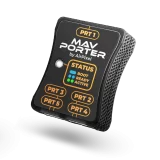
MavPorter
Basics
Last Updated: September 12, 2024Minimal firmware Make sure your MavPorter is running at least FW 21 or later! Initial versions of the firmware may cause issues. Working modes BOOT After each power up of the MavPorter is launched internal boot application. This application waits for instruction for 3 seconds. After 3 seconds will MavPorter launch main application. Bootloder is...
IO description
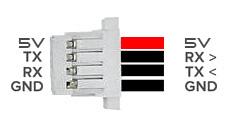
Last Updated: September 3, 2026IO description MavPorter has 5 serial ports used for Mavlink connection. Each port has configurable baudrate Each port has configurable forwarding options Each port has configurable filtering All IO ports GND and 5V pins are interconnected! RX / TX pins uses 3.3V logic, however they are 5V tolerant All ports are JST SH 4 pin,...
Parameter accessing
Last Updated: March 3, 2026Configuration access Configuration of parameters can be done via MissionPlanner, QGC or any other with parameter protocol support MavPorter can be connected anywhere in the drone via MavLink and parameters will be transferred via MavLink to ground control software Firmware update is also done via MavLink without need of dismounting of MavPorter How to connect...
Parameter configuration
Last Updated: September 9, 2026Parameters description EMIT_PARAMS This parameter enables or disables availability of all other parameters. This parameter should be set to 1 in majority of usage scenarios. However if you would like to avoid users from configuration of MavPorter, you can disable configuration by setting of EMIT_PARAMS to 0. Configuration can be enabled back when needed. PRTx_BAUD...
MavPorter firmware update
Last Updated: June 10, 2025Check actual firmware Check with MissionPlanner Power up and connect your drone via USB to the PC with MissionPlanner installed Reboot MavPorter and wait few seconds for MavPorter boot Check MissionPlanner tab “Messages” for MavPorter’s boot Status Message Minimal firmware Make sure your MavPorter is running at least FW 24 or later! Initial versions of...
MissionPlanner plugin (for MavPorter)
Last Updated: February 28, 2026Download and installation STEP 1 Download and unzip MP plugin for MavPorter Download -> Version 1.05 STEP 2 Copy “_MavPorter_plugin.cs” file to your plugins folder in MissionPlanner folder. Usually C:Program Files (x86)Mission Plannerplugins STEP 3 Run Mission Planner Check for new TAB labeled MavPorter STEP 4 Connect MissionPlanner to your drone If MavPorter is detected...