TAG-E
ENTIRE R3
MavPorter
MavCam
Geotagging
PhaseOne P3
Store
More
Manuals
Custom solutions
DJI M600
Sony A7 series
Sony FX6
Nikon Z series
Fuji GFX100(s)
RED KOMODO
Canon EOS R5
Lumix BGH1
ZCAM
BMPCC6k
Alta X
ARRI ALEXA Mini (LF)
RED KOMODO
Sony FX6
Fuji GFX100(s)
Sony Venice
PixHawk
Sony A7 series
Canon EOS R5
View Categories
Home
MavPorter
Parameter accessing
Parameter accessing
< 1 min read
Table of Contents
Configuration access
Configuration access
#
Configuration of parameters can be done via MissionPlanner, QGC or any other with parameter protocol support
MavPorter can be connected anywhere in the drone via MavLink and parameters will be transferred via MavLink to ground control software
Firmware update is also done via MavLink without need of dismounting of MavPorter
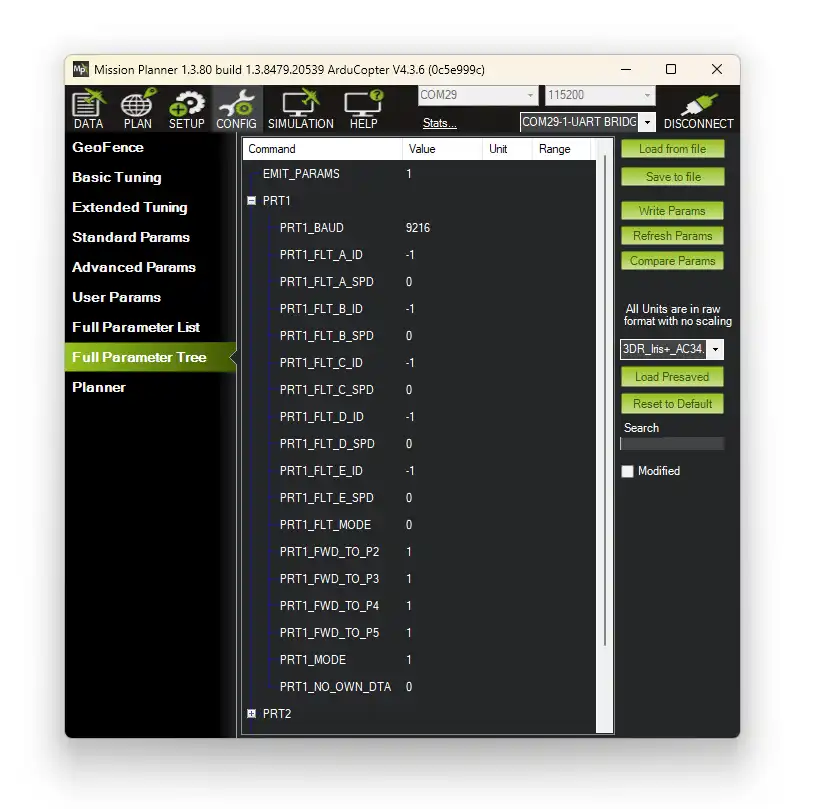
How to connect in Mission Planner
Open MissionPlanner ,select port and click to Connect
Once drone is connected, click to device selection
Select UART_BRIDGE device
Wait for parameters download
How to connect in QGC
Open QGC and wait for automatic drone connection
Once drone is connected, click “Q”
Select Vehicle Configuration
Select Parameters
Select Component 241
IO description
Parameter configuration
Configuration access
Configuration of parameters can be done via MissionPlanner, QGC or any other with parameter protocol support
MavPorter can be connected anywhere in the drone via MavLink and parameters will be transferred via MavLink to ground control software
Firmware update is also done via MavLink without need of dismounting of MavPorter
How to connect in Mission Planner
Open MissionPlanner ,select port and click to Connect
Once drone is connected, click to device selection
Select UART_BRIDGE device
Wait for parameters download
How to connect in QGC
Open QGC and wait for automatic drone connection
Once drone is connected, click “Q”
Select Vehicle Configuration
Select Parameters
Select Component 241