

How to access configuration #
QGC
- Open QGC and wait for vehicle connection
- Open Vehicle Setup page
- Expand “Component 100” in the list
- If you do not see “Component 100”, your Mavlink connection between TAG-E and the Cube is not configured properly. Follow this manual to proceed.
SD card parameter configuration
- TAG-E (with latest wirmware) supports also external configuration loading from micro SD card
- Follow this manual for configuration
- Loading of TAG-E parameters may take few seconds more than standard vehicle parameters. Please be patient.

List of parameters #
IOA_MODE, IOB_MODE, IOC_MODE
Serial port mode IO-A | IO-B | IO-C.
Available options:
- 0 – Disabled
- 1 – Mavlink
- 2 – Mavlink PassThrough
- 3 – NMEA Input
- 4 – NMEA Output
- 5 – Basecam
- 6 – Gremsy
- 7 – Lightware ragefinder
- 8 – EMLID ERB
- 10 – Action Button
IOA_BAUD, IOB_BAUD, IOC_BAUD
Baudrate of ports IO-A | IO-B | IO-C.
Available options:
- 96 – 9 600 bps
- 192 – 19 200 bps
- 384 – 38 400 bps
- 576 – 57 600 bps
- 1152 – 115 200 bps
- 2304 – 230 400 bps
- 4608 – 460 800 bps (fw 0_193 and later)
- 5000 – 500 000 bps
- 9216 – 921 600 bps (fw 0_193 and later)
MAV_GPS_ELLIPSO
When enabled, TAG-E will use Ellipsoidal altitude instead of MSL for geotagging.
- 0 – disabled
- 1 – enabled (default)
MAV_GPS_RAW
When enabled, TAG-E will use GPS_RAW_INT messages instead of GLOBAL_POSITION_INT for geotagging.
- 0 – disabled (default)
- 1 – enabled
MAV_DISMIS_TRG
Disable triggering based on Mavlink commands. When enabled, TAG-E will ignore trigger commands received over Mavlink.
- 0 – disabled (default)
- 1 – enabled
MAV_HIDE_MESGS
Enable, disable or limit amount of messages sent by TAG-E to the user via Mavlink
- 0 – Default messaging
- 1 – Send only error messages
- 2 – All messages send with flag “MAV_SEVERITY_INFO”
- 5 – Disable all status_text messaging
MAV_COMP_ID
- Component ID of TAG-E
- Default value 100 (MAV_COMP_ID_CAMERA)
- Supported values:
- MAV_COMP_ID_CAMERA (100)
- MAV_COMP_ID_CAMERA2 (101)
- MAV_COMP_ID_CAMERA3 (102)
- MAV_COMP_ID_CAMERA4 (103)
- MAV_COMP_ID_CAMERA5 (104)
- MAV_COMP_ID_CAMERA6 (105)
MAV_GMB_ID
This parameter helps with multiple gimbals on board, or when some gimbal is present, but not related to the camera. Set 0 for automatic detection. Set -1 to disable gimbal handling completely. Or set particular component ID for fixed gimbal selection.
- 0 – automatic detection (default)
- -1 – disable reading of all gimbals
- 1-255 target component (gimbal) ID for camera attitude readings
- Typically 154, 171, 172, 173, 174, 175
MAV_LINK_DELAY
This is crucial parameter in terms of geotagging accuracy. Even TAG-E automatically calculates delay of transmission between the Cube and the TAG-E, delay between GPS and flightcontroller + flightcontroller processing time needs to be set manually. Please follow manual for setup, or contact us about setting of this parameter.
Default value is 85 ms.
- -300 to +300
MNT_PITCH_OFF
Custom pitch offset of camera mount:
- -90 to +90 deg
MNT_YAW_OFF
Custom YAW offset of camera mount:
- -180 to +180 deg
OFF_ANT->MNT_X
OFF_ANT->MNT_Y
OFF_ANT->MNT_Z
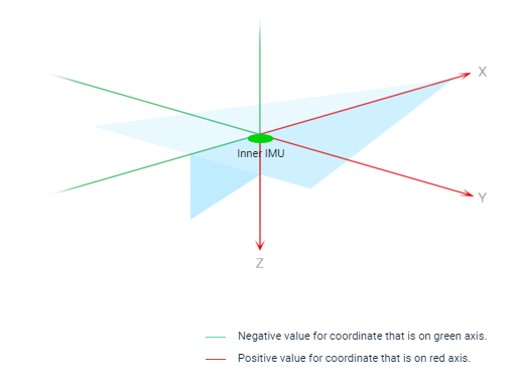
Distance between GPS antenna (if RTK used, distance is measured to antenna A) and camera mount if no gimbal is used. If gimbal is installed, measured distance is between the antenna and gimbal mount center (quickrelease). More information.
- -750 to 750
OFF_CAM->MNT_X
OFF_CAM->MNT_Y
OFF_CAM->MNT_Z
Distance between gimbal mount center and camera mount if gimbal is used. Measure distance between gimbal mount center and camera focal plane center. More information.
- -750 to 750
TIME_ZONE_OFF
Timezone offset. TAG-E receives GPS time, which is universal and related to UTC. For correct local time in geotags, you have to set offset of your timezone.
- -11 to +14
TXT_FIX_TYPE
Append GPS fix level to TXT backup file for each photo.
- 0 – disabled (default)
- 1 – enabled
TXT_FORMAT
Format of TXT output log file
- 0 – Image name, Lat, Lon, Alt, Roll, Pitch, Yaw
- 1 – Image name, Lat, Lon, Alt, Yaw, Pitch, Roll
TXT_GPS_ACCU
Append GPS accuracy level to TXT backup file for each photo.
- 0 – disabled (default)
- 1 – enabled
TXT_RANGE_FNDR
Append Rangefinder measurement data to TXT backup file.
- 0 – disabled (default)
- 1 – enabled
TXT_UTC_TIME
Append UTC time of capture to TXT backup file for each photo.
- 0 – disabled (default)
- 1 – enabled
GTG_FOCAL_LEN
Geotag focal length of the lens (used for cases with fixed lens without electronics). Value of 0 means disabled, any non-zero value will be EXIF geotagged.
- 0 to 200
GTG_FPLANE_RES
Geotag focal plane resolution. Value of 0 means disabled, any non-zero value will be EXIF geotagged.
- 0-100
GTG_GPS_ACCU
Geotag GPS accuracy (Horiznotal and Vertical), detected automatically from Mavlink at the moment of capture.
- 0 – disabled (default)
- 1 – enabled
GTG_GPS_DATW
Geotag GPS Date EXIF tag in JPG files
- 0 – disabled (default)
- 1 – enabled
GTG_IMU_ACCU
Geotag fixed value of IMU accuracy. Value of 0 means disabled, any non-zero value will be EXIF geotagged as fixed value.
- 0 – 10.0
GTG_LAND_DETECT
Automatic detection of landing event. When enabled, TAG-E will start geotagging automatically when drone lands.
- 0 – disabled
- 1 – enabled (default)
GTG_GPS_VERTCS
This parameter enables XMP geotagging of xmp.Camera:HorizCS tag. Source CS of GPS / RTK position depends on positioning device and configuration. TAG-E is unable to detect this automatically.
Available options:
- 0 – disabled (default)
- 1 – WGS 84 (EPSG:4326)
- 2 – ETRS89 (EPSG:4258)
- 3 – NAD83(2011) (EPSG:6318)
- 4 – GDA2020 (EPSG:7844)
- 5 – JGD2011 (EPSG:6668)
- 6 – CGCS2000 (EPSG:4490)
GTG_GPS_HORIZCS
This parameter enables XMP geotagging of xmp.Camera:VertCS tag. Source CS of GPS / RTK position depends on positioning device and configuration. TAG-E is unable to detect this automatically.
Available options:
- 0 – disabled (default)
- 1 – EGM96 (EPSG:5773)
- 2 – EGM2008 (EPSG:3855)
- 3 – Ellipsoidal (EPSG:4979)
- 4 – NAVD88 (EPSG:5703)
- 5 – EVRF2019 (EPSG:9389)
- 6 – Baltic 1957 height (Bpv) (EPSG:8357)
GTG_PPS_ENABLE
This feature enables PPS synchronization. Check pinout for wiring details. Expected is 1Hz rising pulse.
- 0 – disabled (default)
- 1 – enabled
HDMI_FIX_RES
This feature automatically sets defined HDMI out resolution once camera is connected. When parameter is set to 0, TAG-E will not handle HDMI resolution at all.
- 0 —disable HDMI handling
- 1 — 4320p/2160p
- 2 — 2160p
- 3 — 2160p/1080p
- 4 — 1080p
- 5 — 720p
- 6 — 480p
- 7 — 576p
- 260 — 1080i
- 262 — 480i
- 263 — 576i
- 65535 — Auto
GTG_PPK_ENABLE
This parameter enables export of PPK output in Proppeler format. TXT log file is saved in camera SD card automatically after geotagging. Vhen value is set to “2”, QGC will show optional values (Manufacturer, Model, serial number) under camera exposure settings.
- 0 – disabled (default)
- 1 – enabled
- 2 – show settings in GUI
GTG_R_P_Y
This parameter enables geotagging of Roll, Pitch, Yaw of the camera.
- 0 – disabled
- 1 – enabled (default)
FW_SAVE_CFG
This feature writes actual configuration to permanent memory of TAG-E. This parameter needs to be written 1 to make new configuration permanent. Value of 1 written via QGC or MP will be automatically reverted to 0 once save is done.
- 0 – default
- 1 – Save settings
FW_UPDATE_CTRL
This parameter controls FW update of TAG-E. Once firmware file is detected on micro SD card in TAG-E’s slot, this parameter turns to 1. Than user can write value of 2 to start update procedure. Settings will not be re-set after update. DO NOT DISCONNECT POWER DURING UPDATE!
- 0 – idle (default)
- 1 – update available
- 2 – start update
- 154 – update failed (firmware file check error)
FW_SAVE_CFG
This feature writes actual configuration to permanent memory of TAG-E. This parameter needs to be written 1 to make new configuration permanent. Value of 1 written via QGC or MP will be automatically reverted to 0 once save is done.
- 0 – default
- 1 – Save settings
FLD_NEW_ENABLE
When enabled, TAG-E will move all geotagged photos to new folder named by date / time with format set in FLD_NEW_FORMAT
- 0 – disabled
- 1 – enabled (default)
FLD_NEW_FORMAT
This parameter confgure format of new folder name.
- 0 – DDMMYYYY_hhmmss (default)
- 1 – YYYYMMDD_hhmmss
- 2 – DD_MM_YYYY_hhmmss
- 3 – YYYY_MM_DD_hhmmss
FLD_REN_FROM_0
When enabled, TAG-E will rename photos to format IMG_0000.jpg for each flight. This feature is available only when FLD_NEW_ENABLE is enabled.
- 0 – disabled
- 1 – enabled (default)
FLD_NEW_FORMAT
This parameter confgure format of new folder name.
- 0 – DDMMYYYY_hhmmss (default)
- 1 – YYYYMMDD_hhmmss
- 2 – DD_MM_YYYY_hhmmss
- 3 – YYYY_MM_DD_hhmmss


